




跳到內容

AI Integration

本頁內容尚未翻譯。

Pro Feature

AI integration features require a Pro license. This includes live context files and ready-made prompts.


GalataJ integrates with AI assistants (ChatGPT, Claude, Cursor, GitHub Copilot, etc.) to help you analyze performance data and get optimization suggestions. The plugin automatically generates context files that AI can read.

AI Integration Overview


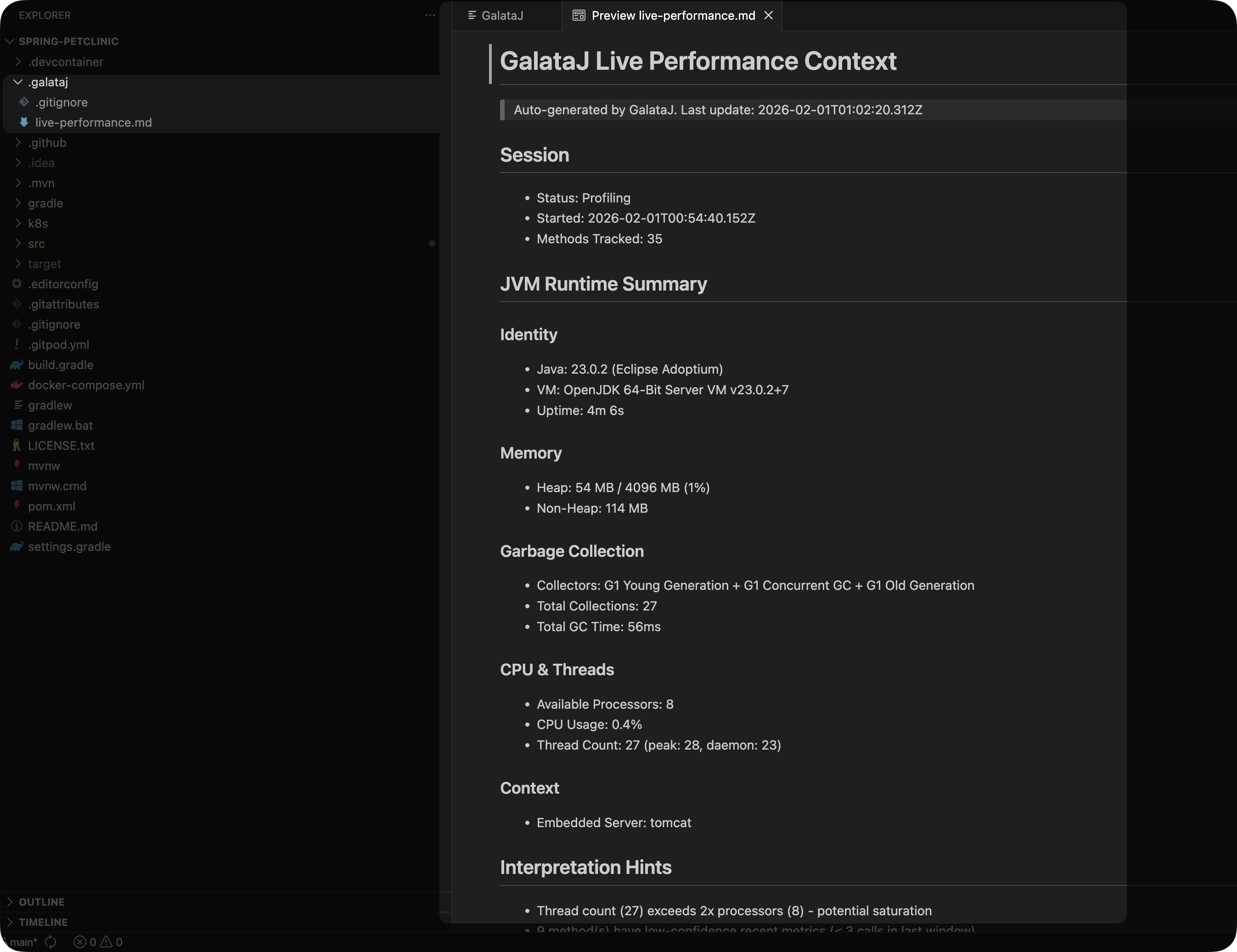
GalataJ automatically generates a live-performance.md file in your project’s .galataj/ folder. This file contains real-time profiling data formatted for AI consumption.

your-project/
├── .galataj/
│ ├── live-performance.md ← Current profiling data
│ └── baseline-live-compare.md ← Comparison with baseline
├── src/
└── ...

The file includes:

# GalataJ Live Performance Report
Generated: 2024-01-15 14:30:22
## JVM Runtime Summary
- Java: 21.0.1 (Eclipse Adoptium)
- Heap: 245 MB / 512 MB (48%)
- GC: G1GC (12 collections, 180ms total)
- Processors: 8, Threads: 42
## Top Methods by CPU Time
| Method | Avg CPU | Max CPU | Calls | Alloc |
|--------|---------|---------|-------|-------|
| OrderService.processOrder | 45.2ms | 120.5ms | 1,234 | 82KB |
| PaymentGateway.charge | 38.1ms | 95.2ms | 456 | 24KB |
| UserRepository.findById | 12.3ms | 45.6ms | 3,421 | 8KB |
## Context Detection
- HTTP Endpoints: 12 tracked
- Database Queries: 8 patterns detected
- Scheduled Tasks: 3 active

The file updates automatically while profiling is active:

  • Default interval: Every 5 seconds
  • Configurable: Settings → GalataJ → Live Context Refresh

Live Performance File


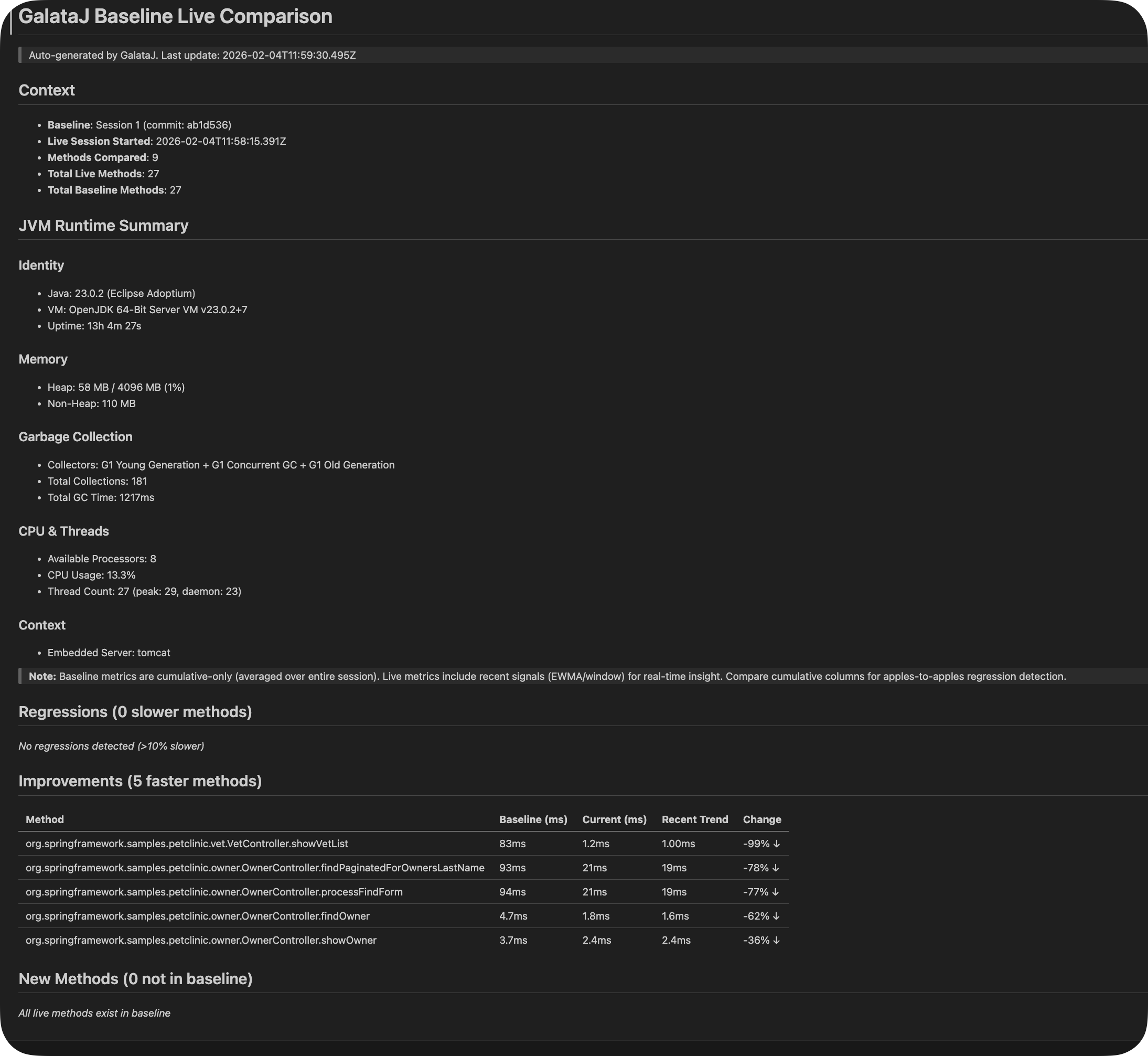
When you have a baseline set, GalataJ also generates baseline-live-compare.md showing real-time comparison between your baseline and current performance.

# Baseline vs Live Comparison
Baseline: "v2.0.0 Release" (2024-01-10)
Live: Current session
## Summary
- Methods improved: 12
- Methods regressed: 3
- Methods unchanged: 45
## Regressions (Attention Required)
| Method | Baseline | Live | Delta | Trend |
|--------|----------|------|-------|-------|
| OrderService.validate | 5.2ms | 12.8ms | +146% | ↑ SLOWER |
| CacheService.get | 0.3ms | 2.1ms | +600% | ↑ SLOWER |
## Improvements
| Method | Baseline | Live | Delta | Trend |
|--------|----------|------|-------|-------|
| ReportGenerator.build | 850ms | 120ms | -86% | ↓ FASTER |

Baseline Compare File

AI Tip

When asking AI about performance, point it to these files: “Read .galataj/live-performance.md and suggest optimizations for the slowest methods”


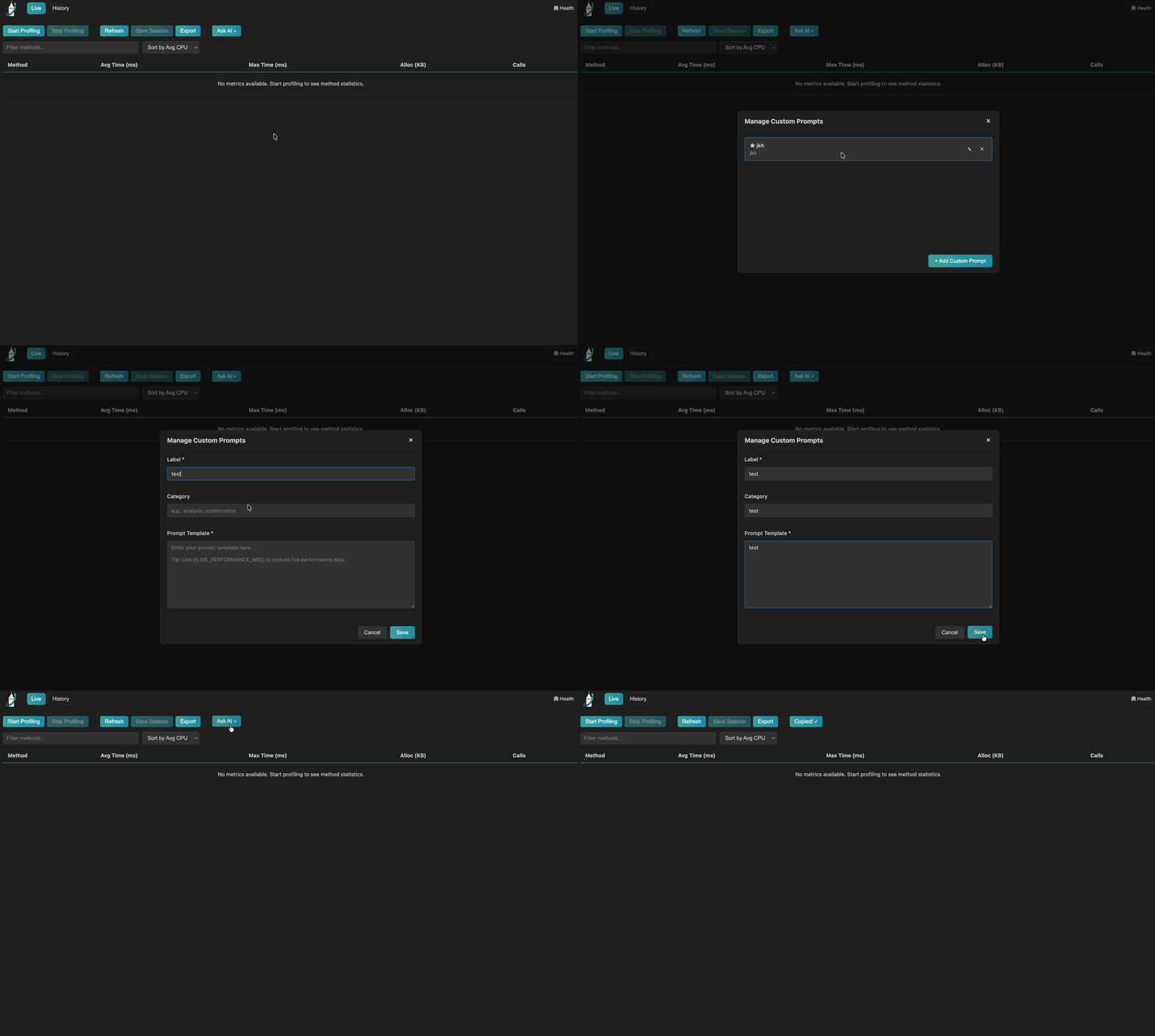
GalataJ includes pre-built prompts optimized for performance analysis. Copy them with one click and paste into your AI assistant.

IntelliJ IDEA:

  1. Open the Profiler tool window
  2. Click the AI Prompts dropdown
  3. Select a prompt
  4. Click Copy to Clipboard

IntelliJ AI Prompts

VS Code / Cursor / Windsurf:

  1. Open the GalataJ sidebar panel
  2. Find the AI Prompts section
  3. Click on a prompt to copy

VS Code AI Prompts

Analyze Performance Regressions

Identifies hotspots, analyzes bottlenecks (CPU vs IO), detects unusual patterns, compares against baseline.

Suggest Concrete Optimizations

Provides code-level fixes: algorithm improvements, caching opportunities, N+1 query fixes, memory reduction.

GC & Memory Analysis

Analyzes allocation patterns, object churn, potential leaks, and suggests object pooling, StringBuilder usage.

IO vs CPU Bound Diagnosis

Determines if methods are CPU-bound, IO-bound, or suffering from lock contention. Recommends appropriate solutions.


Context: Java/Spring Boot application runtime profiling data.
Goal:
1. Identify the top performance hotspots
2. Analyze potential bottlenecks (CPU-bound vs IO-bound)
3. Look for unusual patterns (high call counts, memory allocation spikes)
4. Compare against baseline if available
Provide a concise analysis focusing on actionable insights.
Context: Java/Spring Boot application runtime profiling data.
Goal:
Suggest specific, code-level optimizations for the slowest methods. Focus on:
1. Algorithm improvements (O(n) complexity reductions)
2. Caching opportunities
3. Database query optimizations (N+1, missing indexes)
4. Memory allocation reduction
For each suggestion:
- Explain WHY it would help
- Provide a code example if applicable
- Estimate potential improvement
Context: Java/Spring Boot application runtime profiling data.
Goal:
Analyze memory allocation patterns and potential GC pressure:
1. Methods with high allocation rates
2. Object churn patterns (many small allocations)
3. Potential memory leaks (growing allocations over time)
4. Large object allocations that might bypass TLAB
Suggest:
- Object pooling opportunities
- StringBuilder vs String concatenation
- Collection sizing optimizations
- Stream vs loop trade-offs

For AI assistants like Cursor that support custom rules, GalataJ provides a special “Copy AI Rules” button. This copies a ruleset that teaches the AI how to work with GalataJ data.

Copy AI Rules Button

# GalataJ Performance Analysis Rules
When analyzing Java/Spring Boot performance, always consider:
## Data Sources
- Read .galataj/live-performance.md for current profiling data
- Read .galataj/baseline-live-compare.md for baseline comparisons
## Analysis Guidelines
1. Focus on methods with highest avgCpuMs first
2. Check callCount - high counts may indicate N+1 queries
3. Compare against baseline for regression detection
4. Consider thread context (request vs async vs scheduler)
## Response Format
- Be concise and actionable
- Provide code examples when suggesting fixes
- Prioritize by impact (CPU time × call count)
- Always explain WHY a change would help
  1. Click Copy AI Rules
  2. Open Cursor Settings → Rules
  3. Paste the rules
  4. Cursor will now automatically consider GalataJ data

  1. Copy the desired prompt from GalataJ
  2. Open the AI chat
  3. Paste the prompt
  4. Copy contents of .galataj/live-performance.md
  5. Paste and send
  1. Add AI Rules to your IDE settings
  2. Ask questions like:
    • “Why is OrderService.processOrder slow?”
    • “How can I optimize the top 5 methods in live-performance.md?”
    • “Compare baseline vs live and explain the regressions”
  1. Open Copilot Chat
  2. Type: “Read @.galataj/live-performance.md and suggest optimizations”

GalataJ collects different levels of data for AI analysis:

Tier 1: Always-On

Zero overhead
Method metrics, call counts, execution time, allocations

Tier 2: Environment

Low overhead
JVM info, heap usage, GC stats, thread counts

Tier 3: Deep

Opt-in (Future)
Thread dumps, JFR excerpts, stack traces

  • ❌ Request/response bodies
  • ❌ User data or PII
  • ❌ Database query contents
  • ❌ Environment variables
  • ❌ Sensitive JVM flags

Be Specific in Your Questions

Instead of “Why is my app slow?”, ask “Why is UserService.findAll taking 200ms when baseline was 20ms?”

Include Context

Always point the AI to your .galataj/ files. The more context, the better the suggestions.

Verify Suggestions

AI suggestions are starting points. Always profile again after implementing changes to verify improvements.


IssueSolution
Files not generatedCheck Pro license: galataj license status
Files not updatingEnsure profiling is active and refresh interval is set
AI gives generic adviceMake sure you included the file contents, not just the path
Prompts not showingRefresh prompts in settings or restart the plugin